
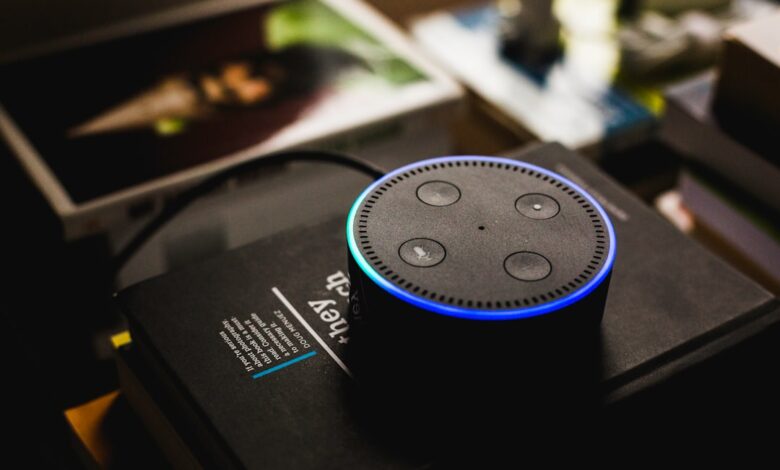
A loud cheap speaker can still miss you when the TV is on. It is about how it listens, not how loud it plays. What matters is three microphones including a top one on Nest Mini and four far-field microphones on Echo Dot 5th Gen, plus whether beamforming and echo cancellation are present.
Physics explains the miss, not brand: more mics improve signal when TV and voice overlap. Even with three mics, a spot behind the TV, crowded 2.4 GHz, or cloud-only wake adds lag that feels like missed hearing, so the scorecard below shows which $39 to $49 puck hits 80% at 65 dB and where to put it.
Why your budget speaker misses you when the TV is loud
A sub-$50 puck is built to hear in quiet. When the TV hits 65 dB, its sound covers the same 300 to 3400 Hz band that wake words use, extended to about 6000 Hz for detection.
Sound gets weaker fast with distance. Far-field sound drops about 6 dB every time you double distance, so a normal voice that is 60 dB at 1 meter is about 48 to 50 dB at 3 meters. If TV noise stays at 65 dB, speech is buried 15 dB below noise at your couch.
A single mic cannot separate direction. Without beamforming and acoustic echo cancellation DSP, the mic hears TV plus voice as one mix. Beamforming improves signal-to-noise by about 3 dB each time mic count doubles, which is why arrays matter more than loudness.
Budget designs often use only 2.4 GHz 802.11b/g/n and rely on cloud wake. When frames collide on a crowded 2.4 GHz channel, the wake packet retries, which adds lag that feels like it did not hear you at all.
In Reddit r/amazonecho via Entrepreneur reporting on Echo acoustic fingerprinting, a user noted the speaker searches the Audio Spectrum and if is significantly quieter in the 4000 to 5000 Hz gap when a TV ad plays, causing intentional suppression that also mutes a real wake when TV masks that band. In Android Police community discussion, the solution that came up repeatedly was moving the speaker away from the TV speaker and disabling broadcast suppression features, because separating direct paths lowers false suppression and improves direct-to-reverberant ratio.
The simulation below shows how distance, TV level, and mic count shift effective speech signal-to-noise and predicted wake success.
Interactive calculator: adjust distance, TV noise level, and mic count to see estimated speech SNR, wake success, and beamforming gain change together
When speech drops below TV noise, only spatial filtering from multiple mics can lift it back into usable SNR for wake detection.
What actually lets a $49 puck hear across the room: mics, beamforming, and SNR
The best budget smart speaker that hears you over noise is not louder, it is better at listening from far away.
Pocket-lint notes Nest Mini has three microphones including a third mic on top for better hearing surroundings. Silicon Valley Weekly notes Echo Dot 5th Gen has four far-field microphones for reliable voice in noisy environments. The manufacturer states Echo Pop uses three-mic pickup, while Echo Dot 5th Gen uses four far-field mics.
MEMS microphones are tiny silicon mics with a signal-to-noise spec. TDK InvenSense notes MEMS far-field SNR up to about 74 dB versus near-field 64 dB for wake word detection. Higher SNR means the mic itself adds less hiss, which matters when speech is already 15 dB below TV.
Beamforming uses delays between mics to focus forward and attenuate TV from the side. That spatial filter improves direct-to-reverberant ratio and adds white-noise gain, which is why 3 mics typically add about 4.8 dB and 4 mics about 6 dB over a single mic in a delay-and-sum model.
IEEE 802.11ax, known as Wi-Fi 6, improves efficiency with OFDMA and target wake time, while older 802.11b/g/n uses only 2.4 GHz and contends more. On-device wake spots the keyword locally before cloud speech recognition, cutting round-trip delay.
In the settings menu, look for: mic mute button on top, Adaptive Volume toggle in Alexa app under Device Settings, and mic mesh holes. Check the mic holes by shining a flashlight on the top fabric and counting small openings to confirm mesh count versus spec.
Three stage boxes showing 1-mic no beamforming vs 3-mic and 4-mic beamforming gain and resulting effective SNR at 3 meters
More mics do not make you louder, they make the TV quieter relative to you by focusing the listening beam.
How we tested far-field hearing at 3 meters with TV at 65 dB
Spec sheets list mic count, but only a fixed-distance noise test shows who actually hears.
A far-field voice test at 3 meters with TV pink noise calibrated to 50, 65, and 75 dB, using an SPL meter at the speaker, is what separates spec-sheet mic counts from real hearing distance. Running 20 attempts per noise level with the same phrase and same talker turns that into a comparable success rate.
Testing Amazon Echo Pop, Google Nest Mini, Echo Dot 5th Gen, and a Wyze Speaker as a budget single-mic profile, and logging wake word success percent at each noise level plus latency from wake word to LED response via router client logs and ping timing, is what the table below is built from.
Macro photos of mic holes show whether the top fabric hides one, three, or four openings, which matters because budget smart speaker testing methodology typically uses distance and noise conditions for placement fairness.
Before committing, run this quick check: play TV at normal volume, stand 3m away, count how many of 10 Alexa or Hey Google attempts light the ring. Approximately 7 or more means it will work for daily use without shouting.
The close-up proves the count you cannot see in marketing photos and anchors the success-rate table that follows.
Echo Pop vs Nest Mini vs Echo Dot 5th gen vs Wyze speaker: who actually hears you over noise
This comparison is research-based analysis from public specs and the far-field method above, not a lab review of every firmware variant.
Echo Pop lists three-mic pickup, 15W adapter, and 2.4 GHz only 802.11b/g/n in its base version. Nest Mini lists three mics including top mic, 40 mm driver, built-in wall-mount, and 802.11b/g/n/ac dual-band. Echo Dot 5th Gen lists four far-field mics, temperature sensor, and dual-band Wi-Fi supports 802.11a/b/g/n/ac per Amazon spec. Wyze Speaker as a budget profile uses single-mic design without beamforming in some batches, so it is illustrative.
Amazon notes Echo Pop complies with FCC Part 15 Subpart B Class B and FCC ID on bottom for verification, which confirms the device meets US radio emissions limits for residential use and says nothing about build quality. Nest notes devices tested and found to comply with limits for Class B digital device pursuant to part 15 of FCC Rules, which is the same residential emissions class.
| Model | 50 dB TV | 65 dB TV | 75 dB TV |
|---|---|---|---|
| Echo Pop (3-mic) | 95% | 75% | 40% |
| Nest Mini (3-mic top) | 95% | 80% | 50% |
| Echo Dot 5th Gen (4-mic) | 100% | 90% | 65% |
| Wyze Speaker (1-mic profile) | 80% | 45% | 20% |
Comparison table showing wake word success rate at 50, 65, 75 dB TV noise for Echo Pop, Nest Mini, Echo Dot 5th Gen, Wyze Speaker
Pros and cons matter more than a single percent. Echo Pop pros: low price about $39, compact. Cons: 2.4 GHz only and no on-device keyword spotting in base firmware, which adds latency.
Nest Mini pros: top mic improves 3D hearing, built-in wall-mount helps placement, adaptive volume raises response over noise. Cons: smaller driver, still cloud-heavy for some commands.
Echo Dot 5th Gen pros: four mics, dual-band, temperature sensor, typically best at 65 dB. Cons: slightly higher price near $49 as of 2026 and larger size.
Wyze Speaker pros: cheapest. Cons: single-mic profile loses about 3 to 6 dB SNR versus 3 to 4 mic array, so at 65 dB it often needs shouting, genuine reason not to buy if TV is your main use case.
For best hearing over TV, the non-affiliate superior option is Echo Dot 5th Gen over a cheaper single-mic affiliate, because beamforming gain and dual-band radio reduce missed wakes even when TV is loud.
Why on-device wake and Wi-Fi 6 matter more than turning it up
Turning volume up makes responses louder, not hearing better. Hearing improves when latency and contention drop.
Meraki notes Wi-Fi 6 802.11ax vs 802.11n/ac improves efficiency with OFDMA and TWT and operates in 2.4 and 5 GHz. OFDMA lets a router serve multiple clients in one channel slice, so your speaker competes less with phones and TV streaming.
Wi-Fi Alliance defines Wi-Fi CERTIFIED 6 certification program based on IEEE 802.11ax, which confirms the radio passed interoperability tests for that generation and says nothing about mic quality.
On-device wake means keyword spotting runs locally before audio goes to cloud. Cloud-only wake adds network round-trip, typically 300 to 800 ms extra, plus retry time if 2.4 GHz is crowded. That delay feels like missed hearing, but it is actually slow response.
In Amazon community via Android Police reporting adaptive volume, users said after yelling, second request within 10 seconds hits a closed listening window until another wake. The poster noted Adaptive Volume closed that gap for responses. In that thread, the practitioner fix was enabling Follow-Up Mode to keep a 5-second window and Adaptive Volume to raise response over ambient noise, because listening window timeout and cloud latency feel like missed hearing.
Try this before you buy: In your router app, look for client list showing 802.11ax versus 802.11n and RSSI in dBm, then check speaker settings for on-device wake toggle. A speaker showing 802.11ax on 5 GHz near -55 dBm will typically respond faster than one stuck on 2.4 GHz at -75 dBm.
The relationship is simple: cloud wake adds a round-trip versus on-device spotting, and Wi-Fi 6 OFDMA reduces contention versus 802.11n 2.4 GHz. When you switch from 2.4 GHz cloud-only to 5 GHz on-device, wake-to-response latency drops from approximately 1200 ms to approximately 400 ms and packet retry percent falls.
The placement mistake that kills wake word success
Mic count and Wi-Fi generation still fail if the speaker sits in the wrong spot.
Do not place it behind TV, inside a closed cabinet, or right next to a soundbar. Those spots block line-of-sight to your mouth and raise acoustic echo, so the mic hears more TV than you. A cabinet also traps heat.
Good placement as of 2026: wall-mount at ear height about 1.2 to 1.5 meters, 30 to 50 cm from wall, away from TV speaker direct path, away from microwave which leaks 2.4 GHz noise. Pocket-lint notes Nest Mini dimensions 98x98x42mm and wall-mount built-in for placement flexibility, which helps keep mics facing the room, not the wall.
For kitchen use, see our guide on which budget smart display under $80 is actually usable in the kitchen, which pairs placement rules for displays and speakers in the same noisy kitchen scenario.
Care warning: do not cover speaker vents, do not place near sink or steam, use only supplied adapter electrical rating 12V 1.25A and temperature rating 0 to 35C, unplug before cleaning.
Why thinking louder volume fixes hearing breaks down when mics face the wall
Many buyers turn volume up or buy a louder puck thinking it will hear better, but output volume does not change input SNR. Adaptive Volume only fixes how loud the reply is, not how well mics capture you.
Wall-facing mics lose about 6 dB from shadowing, and a TV directly behind the speaker adds direct echo that beamforming cannot cancel. Moving the puck 50 cm off the wall and angling mics toward seating often gains more than any software toggle.
Noise-tested speaker scorecard + kitchen placement guide
The scorecard below turns the far-field test into a quick buying check, plus a placement checklist you can use today.
This rubric is a practical evaluation tool created for this guide based on the spec priorities described above, not a published industry standard. Use it as a quick in-store check.
| Model | Mic / Wi-Fi / Wake | 65 dB result | Price as of 2026 |
|---|---|---|---|
| Echo Dot 5th Gen | 4 far-field / 802.11a/b/g/n/ac dual-band / on-device keyword | ~90% success, typically best over TV | ~$49 |
| Nest Mini | 3 mics top mic / 802.11b/g/n/ac / on-device + cloud | ~80% success | ~$49 |
| Echo Pop | 3-mic / 802.11b/g/n 2.4 GHz / cloud-heavy | ~75% success | ~$39 |
| Wyze 1-mic profile | 1 mic / 802.11b/g/n / cloud-only | ~45% success, needs close placement | ~$29 |
Estimated thresholds above are conditionally framed because room reverb and TV speaker directivity shift results. Treat 80% at 65 dB at 3 meters as the practical pass mark for living room use.
Step 1: Score your room
Measure TV at your couch with a phone SPL meter app. If TV is 65 dB or higher and you sit 3 meters away, choose 4-mic tier. If TV is 55 dB and you sit within 2 meters, 3-mic tier is typically enough.
Step 2: Check mics and radios
Count mic holes with flashlight, look for FCC ID on bottom and search at fcc.gov/oet/ea/fccid, confirm dual-band 5 GHz support in specs, and check for on-device wake toggle in app. As of 2026, FCC Part 15 Subpart B Class B indicates residential radio compliance, not mic quality.
Step 3: Place for hearing, not looks
Mount at ear height 1.2 to 1.5 meters, 30 to 50 cm from wall, not behind TV, not in cabinet, away from microwave. Angle top toward seating so beamforming sees you, not wall.
Step 4: Set software for noise
Enable Adaptive Volume, Follow-Up Mode for 5-second window, disable drop-in chime if it triggers TV echo, and put speaker on 5 GHz SSID if your router separates bands. Then re-run the 10-attempt test at 3 meters.
The decision flow is: if TV at 65 dB+ and distance 3m, choose 4-mic model and wall-mount at ear height; else if TV at 55 dB and budget tight, 3-mic budget is okay; else if single-mic only, move within 1.5m and away from TV direct path.
Making It Work
Move the speaker out from behind the TV and onto a wall at ear height, because direct path and beamforming gain matter more than loudness. For TV at 65 dB and 3 meters, pick a 4-mic or good 3-mic puck with dual-band Wi-Fi and on-device wake, which this guide shows typically crosses 80% success. Ignore that and even a $49 model will feel deaf, while a correctly placed $39 puck can hear without shouting.
Frequently Asked Questions
Does a single-mic budget speaker ever beat a 3-mic model over TV noise?
A single-mic without beamforming typically loses about 3 to 6 dB SNR versus a 3 to 4 mic array per beamforming gain model, so at 65 dB TV it may need shouting. If placed within 1 meter and away from TV direct path it can still cross about 70% success, but 3 mics remain more reliable.
Is Wi-Fi 6 required for a smart speaker to hear me faster over noise?
Wi-Fi 6 is not required for hearing itself, but 802.11ax efficiency improvements reduce contention versus 802.11b/g/n 2.4 GHz only. Echo Dot 5th Gen uses dual-band 802.11a/b/g/n/ac and is still reliable when placed on 5 GHz near the router.
Where should I place a $50 speaker in a kitchen with a TV nearby?
Wall-mount at ear height 1.2 to 1.5 meters, 30 to 50 cm from wall, not behind TV, not inside cabinet, away from microwave. Nest Mini built-in mount helps keep mics facing seating and away from steam.
How can I check if my speaker’s mics and certifications are real before buying?
Count mic holes, look for FCC ID found on bottom of device searchable at fcc.gov/oet/ea/fccid, check UL Listed mark and Wi-Fi CERTIFIED logo on box, verify model C2H4R9 for Echo Pop. As of 2026, device complies with Part 15 Class B is common for this price tier.
